
Board — Admin Dashboard
@taskora/board is a full-featured, batteries-included admin dashboard for taskora. It ships as a pre-built React SPA served by a Hono backend, so there is no build step on your side — import it, mount it, done.
It's a separate package — install it alongside taskora only if you want the dashboard. No Hono dependency, no static assets, no board code lands in your bundle if you don't.
Unlike bull-board (which focuses on queues) or Flower (Celery-only), the taskora board is task-centric and exposes everything taskora actually does: workflow DAGs, schedules, migrations, flow control, retention, DLQ.
Why a dashboard?
taskora.inspect() gives you programmatic access to every job, but during development and incident response you want eyes on the system. The board covers:
- Observe — real-time task counts, throughput charts, job timelines
- Debug — drill into individual jobs (data, result, error, logs, progress, retry history)
- Visualize — workflow DAG rendering with per-node state colors
- Manage — retry failed jobs, cancel active jobs, pause/resume schedules, clean queues, retry entire DLQ
- Evolve — version distribution per task,
canBumpSinceindicator for safe migration pruning
Installation
@taskora/board is a separate package with taskora and hono as peer dependencies. Install both together:
npm install @taskora/board honoyarn add @taskora/board honopnpm add @taskora/board honobun add @taskora/board honoThe pre-built React SPA and its dependencies (Recharts, @xyflow/react, Tailwind) are bundled inside the @taskora/board package — you do not install them yourself. If you never install @taskora/board, none of that code reaches your bundle.
Quick start
import { createTaskora } from "taskora"
import { redisAdapter } from "taskora/redis"
import { createBoard } from "@taskora/board"

const taskora = createTaskora({
  adapter: redisAdapter("redis://localhost:6379"),
})

// ... define tasks, workers ...

const board = createBoard(taskora)
board.listen(3000)
// → taskora board listening on http://localhost:3000/board
Open http://localhost:3000/board in your browser. That's it.
The Board interface
createBoard(app, options?) returns a Board object with four ways to serve the UI:
interface Board {
  app: Hono                                    // the raw Hono instance
  fetch: (req: Request) => Response | Promise<Response>  // Web standard fetch handler
  handler: (req, res) => void                  // Node.js-style handler (requires @hono/node-server)
  listen: (port: number) => void               // standalone server (Bun / Deno only)
}
Pick whichever fits your host:
const board = createBoard(taskora)
board.listen(3000)Bun.serve({
port: 3000,
fetch: board.fetch,
})Deno.serve({ port: 3000 }, board.fetch)import { Hono } from "hono"
const app = new Hono()
app.route("/admin/taskora", board.app)import { serve } from "@hono/node-server"
// Standalone Node.js server
serve({ fetch: board.fetch, port: 3000 })
// Or as Express middleware (via @hono/node-server helpers)
import { createAdaptorServer } from "@hono/node-server"
const server = createAdaptorServer({ fetch: board.fetch })
expressApp.use("/admin/taskora", (req, res) => server.emit("request", req, res))Framework parity
Anything that speaks the Web Request/Response standard (Bun, Deno, Cloudflare Workers, Hono, Vercel Edge, …) can mount board.fetch directly. For Node.js-native frameworks (Express, Fastify, Koa, Next.js API routes), wrap it with @hono/node-server.
Options
createBoard(taskora, {
  basePath: "/admin/taskora",         // default: "/board"
  readOnly: false,                    // hide mutation buttons + reject POST/PUT/DELETE
  auth: async (req) => { /* ... */ }, // per-request auth middleware
  title: "My Queue",                  // browser tab title
  logo: "/custom-logo.svg",           // header logo URL
  favicon: "/favicon.ico",
  theme: "auto",                      // "light" | "dark" | "auto"
  refreshInterval: 2000,              // stats polling fallback (ms) — SSE is primary
  redact: ["password", "apiKey", "ssn"],  // deep field redaction for job data/result
  cors: { origin: "*" },
  formatters: {
    data:   (data, task) => { /* custom render pre-processing */ return data },
    result: (result, task) => result,
  },
})
Authentication
The board accepts two auth shapes. Pick one; they cannot be combined.
Session auth (recommended)
Drop in a single config object and the board mounts a login page, signs a session cookie, and guards the entire dashboard — SPA HTML, API, and SSE. Inspired by AdminJS: one provider, username + password, nothing else to set up.
createBoard(taskora, {
  auth: {
    // HMAC signing secret, min 32 chars — generate with:
    //   openssl rand -base64 48
    cookiePassword: process.env.BOARD_COOKIE_SECRET!,

    // Called on each login attempt. Return a truthy user object to accept,
    // or null to reject. Your own code owns credential storage (env, DB, LDAP, …).
    authenticate: async ({ username, password }) => {
      if (username === "admin" && password === process.env.BOARD_PASSWORD) {
        return { id: "admin" }
      }
      return null
    },

    // Optional
    cookieName: "taskora_board_session",  // default
    // sessionTtl defaults to `false` — sessions do not expire server-side
    // and the cookie is a browser-session cookie (cleared on browser close).
    // Pass a Duration ("30s" | "5m" | "2h" | "1d" | ms number) to opt into rolling expiry.
    // sessionTtl: "7d",
  },
})
What you get:
GET /board/login— server-rendered login form (no SPA rebuild required).POST /board/auth/login— verifies creds viaauthenticate, sets a signed,HttpOnly,SameSite=Laxcookie, then redirects.POST /board/auth/logout— clears the cookie and redirects back to the login page. The sidebar shows a[ logout ]button automatically when session auth is enabled.- Unauthenticated requests to any SPA path (
/board/*) are redirected to the login page with a?redirect=parameter so users land back where they started. - Unauthenticated requests to the JSON API (
/board/api/*) receive401 {"error":"Unauthorized"}.
Security notes:
- The session cookie is stateless — the user object (and optionally an expiry) is HMAC-signed into the cookie itself. No Redis state, works with every adapter. The trade-off: logout only clears the client cookie; a stolen cookie stays valid until its
exp(or forever, ifsessionTtlis disabled). SetsessionTtlto a tight Duration if that matters to you. SameSite=Lax+HttpOnlydefeats cross-site POST and prevents JS access. No separate CSRF token is required.- The
Secureflag is set automatically when the request reaches the board over HTTPS. - Password hashing, rate limiting, and lockout live inside your
authenticatefunction — the board has no opinion about how credentials are stored.
Custom auth hook
If you already ship JWT, OAuth, or your framework's own session middleware, pass a function instead. It runs on every /board/api/* request. Return undefined to allow, or a Response to short-circuit:
createBoard(taskora, {
  auth: async (req) => {
    const token = req.headers.get("authorization")?.replace("Bearer ", "")
    if (!token || !(await verifyJwt(token))) {
      return new Response("Unauthorized", { status: 401 })
    }
    // return nothing → request proceeds
  },
})
The function form guards only the API — the SPA HTML and static assets stay public, so your own front door (reverse proxy, gateway, framework middleware) is expected to enforce access to the dashboard shell. This matches the pre-session-auth behavior and is preserved for backward compatibility.
For public demos or local dev, pair readOnly: true with no auth.
Field redaction
Job payloads often contain secrets. The redact option walks every field in data, result, error, and logs.meta, masking any key whose name matches (case-insensitive):
createBoard(taskora, {
  redact: ["password", "secret", "token", "apiKey", "ssn", "creditCard"],
})
Nested objects and arrays are walked recursively — user.auth.password and payments[0].creditCard are both redacted. Redaction happens on the server before the response leaves the process, so secrets never touch the browser.
Read-only mode
createBoard(taskora, { readOnly: true })Mutation buttons are hidden in the UI and all POST/PUT/DELETE endpoints reject with 403. Safe to expose behind a read-only employee SSO without risking accidental retries.
What you get
Overview dashboard
Global stat cards (waiting / active / delayed / failed / completed / cancelled / expired), a 24-hour throughput chart powered by Recharts, a task table with per-task counts and health indicators, and Redis server info (version, memory, uptime, connected state).
Throughput is backed by per-minute INCR counters stamped in ack.lua / fail.lua with a 24h TTL, so the chart is accurate without any external time-series database.
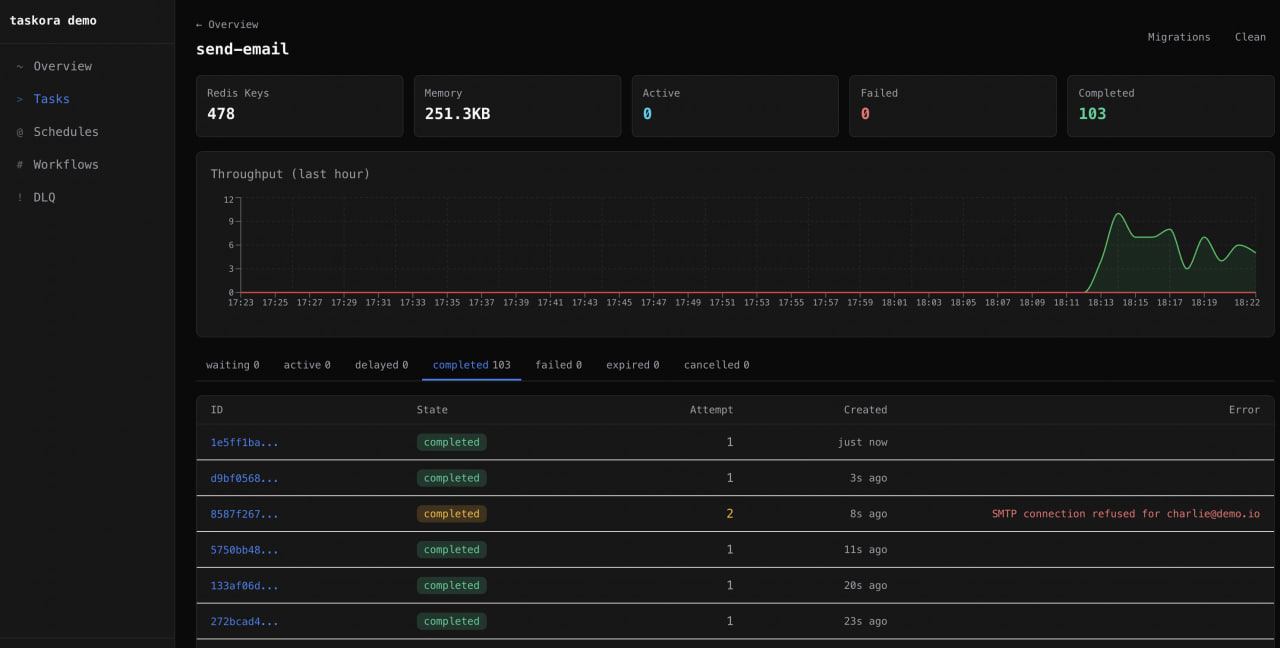
Task detail
Per-task view with state tabs (waiting / active / delayed / retrying / failed / completed / cancelled / expired), a paginated job table, and bulk actions — retry-all and clean-by-age.
Job detail
Everything about a single job on one screen:
- Timeline — reconstructed from
ts→processedOn→finishedOn(state transitions with absolute + relative timestamps) - Data / Result / Error / Logs tabs
- Progress bar — renders numeric progress or arbitrary progress objects
- Attempt history — current attempt number vs
maxAttempts - Actions — retry, cancel (
handle.cancel()equivalent) - Workflow link — jumps to the parent workflow DAG if the job was part of one
Workflow DAG visualization
Built on @xyflow/react with auto-layout (BFS layering). Nodes are colored by state, edges animate when the downstream node is active, and clicking a node opens its job detail view. Chains, groups, and chords all render correctly — including nested compositions. Cancel an entire workflow from the header and watch the cascade propagate.
Schedule management
List all registered schedules with their cron/interval, next-run countdown (relative time display), last run status, and job ID. Actions: pause, resume, trigger-now, delete. The trigger-now button dispatches the task immediately without disturbing the scheduled cadence.
DLQ view
Failed jobs grouped by error-message frequency so you can spot the top failure modes at a glance. Per-job retry and a global "retry all" button backed by the atomic retryAllDLQ.lua script (batched 100 at a time).
Migrations view
Version distribution bar chart per task, showing how many jobs are queued or delayed at each _v version. The canBumpSince indicator tells you whether it is safe to raise since and drop old migrations — taskora checks queue / delayed / retrying sets for any job still stamped with a version below the proposed floor.
See Versioning & Migrations for the underlying mechanics.
Real-time updates (SSE)
The /api/events endpoint streams Server-Sent Events from adapter.subscribe() — every active, completed, failed, retrying, cancelled, stalled, and progress event flows to the browser in real time. A periodic stats:update frame refreshes stat cards every few seconds even when no jobs are moving.
SSE is the primary transport — refreshInterval polling only kicks in as a fallback if the EventSource disconnects.
UX niceties
- Dark / light / auto theme via CSS custom properties (follows
prefers-color-scheme) - Keyboard shortcuts —
1–5for top-level navigation,/for the global job-ID search bar - Global job search — paste a job ID from a log line, land on the detail view
REST API
Under the hood, the SPA talks to a plain REST API mounted at ${basePath}/api. You can call these endpoints directly from your own tooling — they are not considered internal.
| Method | Path | Description |
|---|---|---|
GET | /api/overview | Global stat cards, tasks, Redis info |
GET | /api/tasks/:task/jobs?state=&limit=&offset= | Paginated jobs for a task |
GET | /api/tasks/:task/stats | Queue counts for a task |
GET | /api/tasks/:task/migrations | Version distribution + canBumpSince |
POST | /api/tasks/:task/retry-all | Retry every failed job for a task |
POST | /api/tasks/:task/clean | Trim completed/failed sets |
GET | /api/jobs/:jobId | Full JobDetailResponse with timeline, logs, workflow link |
POST | /api/jobs/:jobId/retry | Retry a single job (must be in failed/cancelled state) |
POST | /api/jobs/:jobId/cancel | Cancel an active or waiting job |
GET | /api/schedules | List all schedules |
POST | /api/schedules/:name/pause | Pause a schedule |
POST | /api/schedules/:name/resume | Resume a schedule |
POST | /api/schedules/:name/trigger | Dispatch immediately without advancing next-run |
PUT | /api/schedules/:name | Update schedule config |
DELETE | /api/schedules/:name | Remove schedule |
GET | /api/workflows | List active/recent workflows |
GET | /api/workflows/:workflowId | Workflow DAG graph + per-node state |
POST | /api/workflows/:workflowId/cancel | Cascade cancel workflow |
GET | /api/dlq | Dead-letter queue jobs with grouping |
POST | /api/dlq/:jobId/retry | Retry single DLQ entry |
POST | /api/dlq/retry-all | Retry entire DLQ (batched) |
GET | /api/throughput | 24h per-minute throughput buckets |
GET | /api/events | Server-Sent Events stream |
GET | /api/config | Static config (title, logo, theme, readOnly flag) |
All mutation endpoints respect readOnly and auth.
Recipes
Mount behind nginx / reverse proxy
Set basePath to match your upstream route so generated asset URLs are correct:
const board = createBoard(taskora, { basePath: "/internal/taskora" })
Bun.serve({ fetch: board.fetch, port: 3000 })location /internal/taskora/ {
proxy_pass http://taskora-host:3000;
proxy_set_header Host $host;
proxy_buffering off; # important for SSE
}Share a port with your API
If you already have a Hono app serving your public API, mount the board on a sub-route instead of running a second port:
import { Hono } from "hono"

const api = new Hono()
api.get("/health", (c) => c.json({ ok: true }))
// ... more routes ...

api.route("/admin/taskora", createBoard(taskora, {
  basePath: "/admin/taskora",
  auth: requireAdmin,
}).app)

Bun.serve({ fetch: api.fetch, port: 8080 })
Redact secrets for a specific task only
redact is global, but formatters gives you per-task control:
createBoard(taskora, {
  formatters: {
    data: (data, task) => {
      if (task === "send-email") {
        const { body, ...rest } = data as any
        return { ...rest, body: "[REDACTED]" }
      }
      return data
    },
  },
})
Expose only to internal network
createBoard(taskora, {
  readOnly: true,
  auth: async (req) => {
    const ip = req.headers.get("x-forwarded-for") ?? ""
    if (!ip.startsWith("10.") && !ip.startsWith("192.168.")) {
      return new Response("Forbidden", { status: 403 })
    }
  },
})
Production checklist
- [ ] Set
auth— never expose the board publicly without it - [ ] Configure
redactfor any sensitive fields in job payloads - [ ] Consider
readOnly: truefor broad internal visibility with narrow write access - [ ] Mount behind HTTPS (board has no TLS — that's your proxy's job)
- [ ] If using nginx, disable
proxy_bufferingon the board location so SSE works - [ ] Pin a stable
basePath— changing it invalidates cached asset URLs in browsers
See also
- Inspector — the programmatic API the board is built on
- Retention & DLQ — what the DLQ view actually operates on
- Monitoring — metrics pipelines for long-term observability (the board is not a replacement for Grafana)
- Workflows — the DAG model the workflow view visualizes
- Versioning & Migrations — what the migrations view reports on